Release Notes
December 2020
What's New
In our December release, we’re sharing our yearly feature and functionality recap as well as introducing four new features: the Enterprise App Catalog; mac Profile Generator; Corporate-owned, Personally-enabled (COPE) device management for Android, and Activation Lock for macOS.
Feature and Functionality Recap 2020
The following is our list of the top KACE Cloud MDM features and functionality introduced in 2020:
Product Expansion
- KACE Unified Endpoint Management License
Usability Enhancements
- Multi-device summary with data visualization
- Enhanced summary section for devices
- Simplified labels section for devices
- Shorter maintenance windows
- Improved user interface elements
- Login experience with simplified workflow
LDAP
- Multi-forest LDAP sync support
SSO
- SAML-based SSO for Google G-Suite
- SAML-based SSO for Okta
New Functionality
- Scheduled OS updates
- Location tracking
- Advanced filtering capabilities
Android
- System apps for Android
- Android agent app
- Single-location option management
macOS
- macOS Active Directory profile support
- SMA Agent installation
- macOS managed apps for Big Sur (11.0)
- Apple web authentication
iOS
- iOS and Android Web apps
- Apple web authentication
- Single-location option management
Windows
- Windows 10 enrollment
- Microsoft 365 deployment
tvOS
- Apple TV support
- Single-location option management
Help Center
- Video section restructure
December Features
Enterprise App Catalog
Our new enterprise app catalog for iOS and Android lets admins publish a set of pre-configured apps that end users can then download through the KACE Cloud Connect app. The catalog feature allows an admin to provision required apps via policy, then allow self-service installation of optional pre-configured apps for end users.
Available apps are OS-specific, so an Android device user will see their own set of OS-approved apps, as will iOS end users.
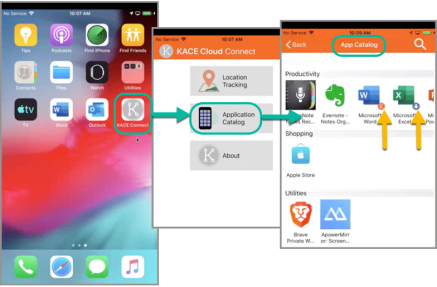
Image: When an end user downloads and opens KACE Cloud Connect on their device, they can open the Application Catalog then choose from a library of pre-configured apps.
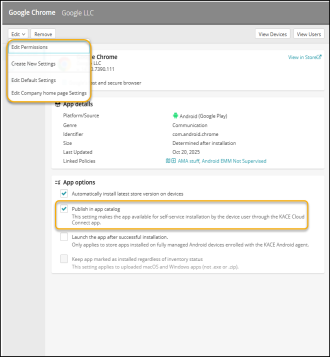
To enable self-service installation for the end user, an admin only needs to check the new ‘Publish in app catalog’ box for individual apps. An admin can also create and edit settings that an end user can choose from.
Learn more about KACE Cloud Connect.
mac Profile Generator
The mac Profile Generator is a macOS native app that generates macOS MDM profiles. These profiles can then be uploaded to KACE Cloud MDM and applied to enrolled macOS devices.
The app lets device admins build profiles specifically for mac that can restrict which applications can run, automatically grant access to macOS privacy sections, and automatically approve kernel and system extensions. Generating profiles using the mac Profile Generator eliminates the need for end users to manage individual security and privacy settings, which can be tricky and time consuming.
_416x327.png)
Image: The mac Profile Generator provides a straightforward wizard process.
Learn more about the mac Profile Generator.
Corporate-owned, Personally-enabled (C.O.P.E.)
Corporate-owned, personally-enabled device management lets an admin provision Android devices with company-approved permissions and restrictions, but also allows personally-enabled options for the end user. Similar to the bring-your-own-device model, COPE offers more company control when it comes to applications, integration and security, but supports the end user’s need for one-device convenience when performing non-enterprise functions.
The enrollment process uses the same zero-touch functionality as other supervised employee-managed devices. In KACE Cloud MDM, COPE can be enabled by checking 'Provision devices as company-owned, employee-enabled (COPE)’ in the edit view.
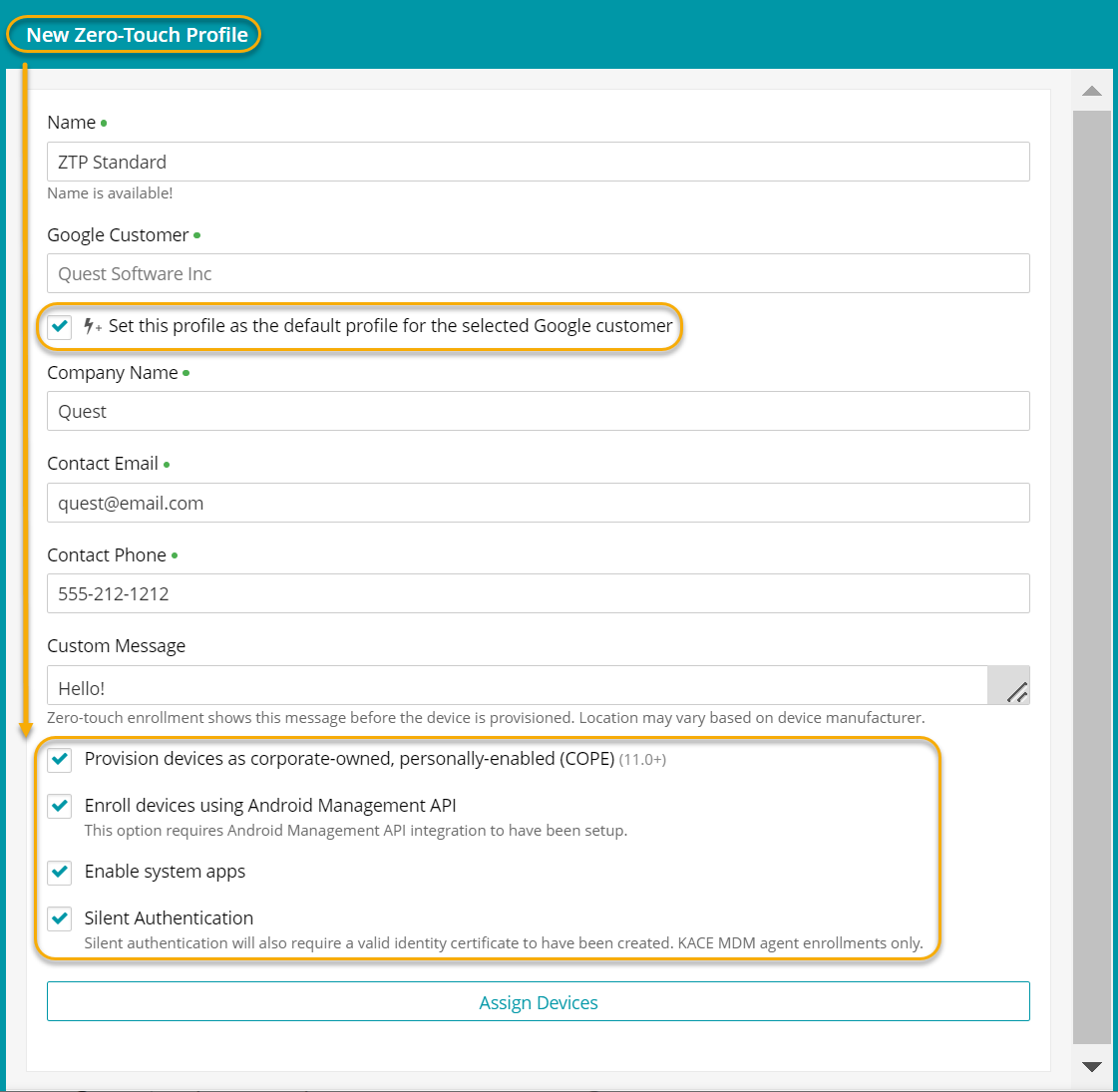
Learn about Zero-Touch enrollment and creating Zero-Touch profiles.
Activation Lock for macOS
Features to help manage against activation lock—i.e., an inaccessible device that has been returned by an employee, are now available for macOS. For full details on managing activation lock for macOS and iOS devices, see Activation Lock in documentation.
Resolved Issues
Bug fixes are included in the resolved issues list for two release periods and are then retired.
| Issue | Description | Status |
|---|---|---|
| 4649 - Android: Restriction command error does not log correctly on device history | When creating a restriction with more than 500 apps, the install command will successfully finish and can be viewed in device history. | FIXED |
| 4643 - Edit Label action redirects incorrectly | When editing a smart label, using 'Back to label library' link will successfully redirect back to label library. | FIXED |
| 4642 - smart label gives incorrect devices | Viewing devices associated with smart label will produce accurate list of devices. | FIXED |
| 4641 - Changing company/personal value for a device may not correctly update policy | Resolved. Device labels are re-evaluated after ownership changes so that app from policy is applied correctly. | FIXED |
| 4639 - macOS BigSur - No Battery Option in macOS Restrictions | When profile is applied, battery icon in system tray is not disabled. | FIXED |
| 4635 - VPP Sync Not Working With Apple B2B Custom Apps | Resolved by enabling custom apps in ABM. | FIXED |
| 4631 - Windows device does not get added to smart label during enrollment | After creating smart label based on Windows inventory, then enrolling Win device with that label, device is correctly added to the smart label. | FIXED |
| 4622 - macOS Big Sur Can Reject Managed Enterprise Apps | After enrollment, app can be successfully installed after installing enterprise applications without flags set for removal. | FIXED |
| 4621 - Manual Enrollment Azure Domain Join Choice Not Saving After Refresh | Company device enrollment now shows Azure Domain Join. | FIXED |
| 4613 - Device history chart hangs on loading huge data and refining filters on command status | Issue resolved by filtering data load. | FIXED |
| 4609 - DeviceSync not running in production for some tenants | Issue resolved by splitting data into smaller buckets. | FIXED |
| 4608 - Windows MSI Installation Not Working With Service Apps | After enrolling device. uploading MSI, and checking "Keep app marked...' checkbox, the app shows as installed as soon as the command succeeds. | FIXED |
| 4606 - Device history search breaks if there are no search results | A device history query using search will return no results and search function will continue to work. | FIXED |
| 4593 - Windows Non Azure Device Ownership Type Not Recorded Properly | The Windows device ownership field accurately records MDM Only, Personal Option via API, Company option via API, and Add Work Account enrollments. | FIXED |
Known Issues
Additional Resources
Getting Started with KACE Cloud MDM
© 2020 Quest Software Inc.
ALL RIGHTS RESERVED.
This guide contains proprietary information protected by copyright. The software described in this guide is furnished under a software license or nondisclosure agreement. This software may be used or copied only in accordance with the terms of the applicable agreement. No part of this guide may be reproduced or transmitted in any form or by any means, electronic or mechanical, including photocopying and recording for any purpose other than the purchaser’s personal use without the written permission of Quest Software Inc.
The information in this document is provided in connection with Quest Software products. No license, express or implied, by estoppel or otherwise, to any intellectual property right is granted by this document or in connection with the sale of Quest Software products. EXCEPT AS SET FORTH IN THE TERMS AND CONDITIONS AS SPECIFIED IN THE LICENSE AGREEMENT FOR THIS PRODUCT, QUEST SOFTWARE ASSUMES NO LIABILITY WHATSOEVER AND DISCLAIMS ANY EXPRESS, IMPLIED OR STATUTORY WARRANTY RELATING TO ITS PRODUCTS INCLUDING, BUT NOT LIMITED TO, THE IMPLIED WARRANTY OF MERCHANTABILITY, FITNESS FOR A PARTICULAR PURPOSE, OR NON-INFRINGEMENT. IN NO EVENT SHALL QUEST SOFTWARE BE LIABLE FOR ANY DIRECT, INDIRECT, CONSEQUENTIAL, PUNITIVE, SPECIAL OR INCIDENTAL DAMAGES (INCLUDING, WITHOUT LIMITATION, DAMAGES FOR LOSS OF PROFITS, BUSINESS INTERRUPTION OR LOSS OF INFORMATION) ARISING OUT OF THE USE OR INABILITY TO USE THIS DOCUMENT, EVEN IF QUEST SOFTWARE HAS BEEN ADVISED OF THE POSSIBILITY OF SUCH DAMAGES. Quest Software makes no representations or warranties with respect to the accuracy or completeness of the contents of this document and reserves the right to make changes to specifications and product descriptions at any time without notice. Quest Software does not make any commitment to update the information contained in this document.
If you have any questions regarding your potential use of this material, contact:
Quest Software Inc.
Attn: LEGAL Dept.
4 Polaris Way
Aliso Viejo, CA 92656
Refer to our website (www.quest.com) for regional and international office information.
Patents
Quest Software is proud of our advanced technology. Patents and pending patents may apply to this product. For the most current information about applicable patents for this product, please visit our website at www.quest.com/legal.
Trademarks
Quest and the Quest logo are trademarks and registered trademarks of Quest Software Inc. in the U.S.A. and other countries. For a complete list of Quest Software trademarks, please visit our website at www.quest.com/legal. All other trademarks, servicemarks, registered trademarks, and registered servicemarks are the property of their respective owners.